New Feature Alert! Password Policy Configuration by Portal

Written by Cyndi Arnold
Updated on Sep 03, 2026
New Feature Alert! Password Policy Configuration by Portal
Overview
Wastebits now allows configuration to password requirements on a portal level. Instead of a single platform-wide default, each portal can now set its own rules for password length, complexity, expiration, and reuse, giving portal owners control over the security posture of their own users.
1. Accessing Password Policy Settings
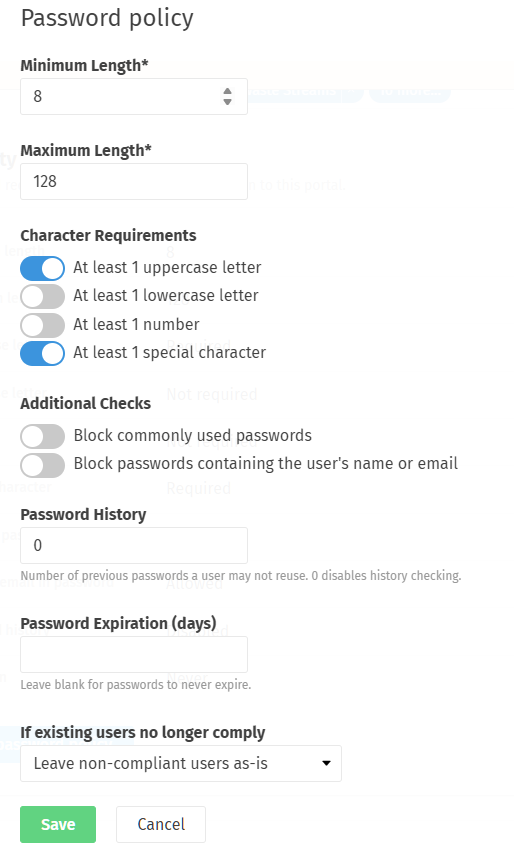
Portal administrators can find these settings by clicking their company name in the bottom left of the navigation bar, then selecting Security within the Details tab.
This panel lets an admin define the requirements new and existing passwords must meet within their portal.
2. Setting Password Length
Two fields control how long a password must be:
- Minimum Length - the fewest characters a password may contain (default: 8).
- Maximum Length - the most characters a password may contain (default: 128).
3. Character Requirements
Admins can toggle on any combination of the following rules. When enabled, a password must include:
- At least 1 uppercase letter
- At least 1 lowercase letter
- At least 1 number
At least 1 special character
Note: Wastebits' platform default only requires an uppercase letter and a special character.
4. Additional Checks
Beyond character composition, admins can enable two extra safeguards:
- Block commonly used passwords - rejects passwords that appear on known weak/breached password lists.
- Block passwords containing the user's name or email - prevents users from choosing a password that's easy to guess based on their own account details.
5. Password History
The Password History field sets how many previous passwords a user may not reuse. Setting this to 0 disables history checking entirely, allowing a user to reuse an old password.
6. Password Expiration
The Password Expiration (days) field determines how often users must change their password. Leaving this field blank means passwords never expire.
7. Handling Existing Non-Compliant Users
If an admin tightens the password policy after users already have accounts, some existing passwords may no longer meet the new rules. The "If existing users no longer comply" dropdown determines what happens to those users:
- Leave non-compliant users as-is - no action is taken; existing passwords remain valid until the user changes them on their own.
- Force a password reset at next login - non-compliant users are required to set a new, compliant password the next time they log in.
Warn users, but don't force a reset - non-compliant users are notified that their password doesn't meet the current policy, but are not blocked from logging in until they choose to update it.
Note: This setting only affects users whose current password no longer meets the policy. It does not apply to new passwords going forward, which are always validated against the active rules.
8. Who Can Help?
If you have questions about configuring your portal's password policy, contact:
Wastebits Support
help@wastebits.com
(844) 724-0200