New Feature Alert! Manifest Document Storage

Written by Cyndi Arnold
Updated on Dec 15, 2025
Documents
Open the Manifest to which you wish to attach a document. Click on the Documents tab, then select Upload New Document.
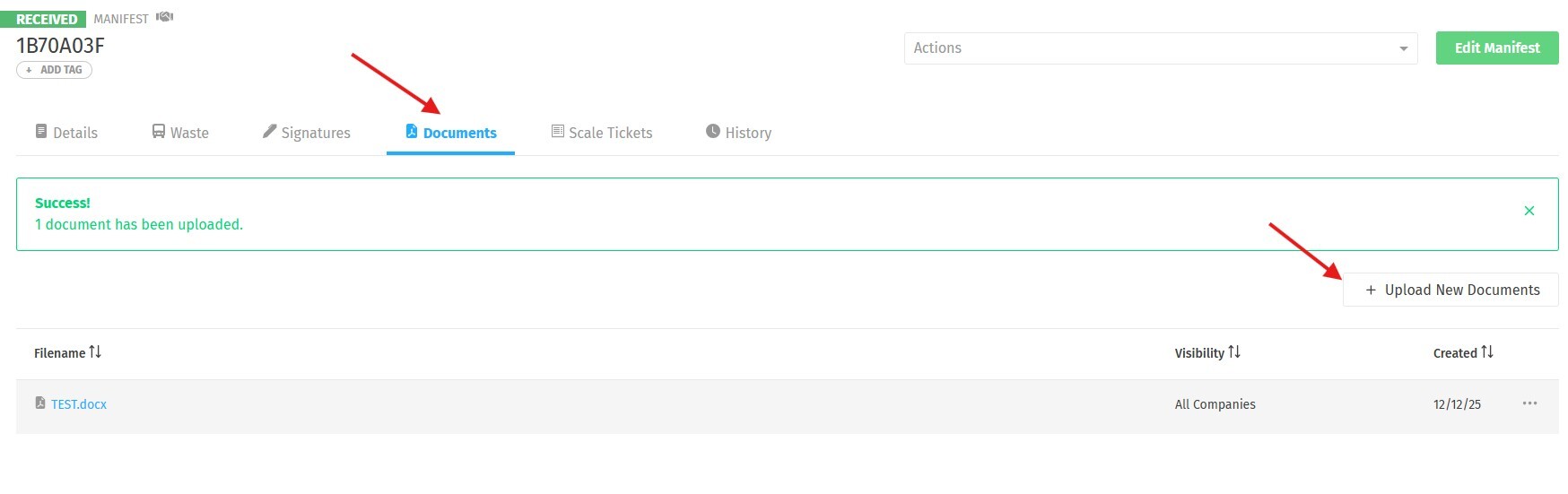
You will have the option to select which Companies on the Waste Stream should have access to the Document:
- All Companies: Document is visible to anyone who has access to the Waste Stream
- Facility and Billing Companies: Document is shared only between members of the Billing Company and Waste Facility, and not visible to anyone else on the Waste Stream
- Only My Company: Document is only visible to members of the Company of the User who uploaded the Document. This feature is only available to Facility Users.
Acceptable Document Types:
- PDF (.pdf)
- MS Excel (.xls, .xlsx, .xlt, .xla)
- MS Word (.doc, .docx)
- Rich Text Format (.rtf)
- Plain Text (.txt)
- Images (.jpeg, .jpg, .png, .gif, .tiff)
- Zip (.zip)
- MS Outlook (.msg)

Documents uploaded in error may be deleted by hovering over the three dots to the right of the document and selecting Delete from the menu.
